
Web Scraping Bằng Python: Thu Thập Dữ Liệu Từ Website Với BeautifulSoup Và Requests
Chia sẻ
"Hướng dẫn từ A-Z cách dùng Python BeautifulSoup và Requests để scrape dữ liệu từ website — lấy bảng giá, tin tức, danh sách sản phẩm tự động."
1. Web Scraping Là Gì?
Web scraping là kỹ thuật tự động thu thập dữ liệu từ website. Thay vì copy-paste thủ công, Python có thể tải trang web, phân tích HTML, và trích xuất chính xác dữ liệu bạn cần.
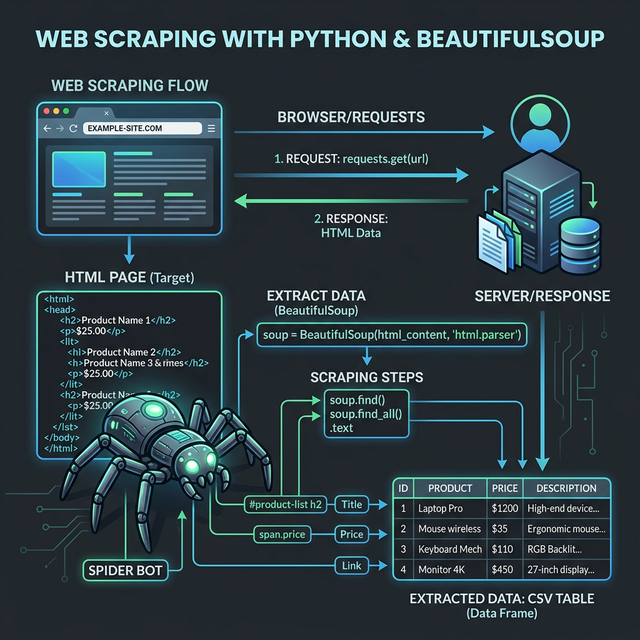
2. Cài Đặt
pip install requests beautifulsoup4 pandas3. Ví Dụ 1: Lấy Tiêu Đề Báo
import requests
from bs4 import BeautifulSoup

url = "https://vnexpress.net"
response = requests.get(url)
soup = BeautifulSoup(response.text, "html.parser")

# Lấy tất cả tiêu đề bài viết
headlines = soup.find_all("h3", class_="title-news")

for h in headlines[:10]:
    link = h.find("a")
    if link:
        print(f"📰 {link.text.strip()}")
        print(f"   🔗 {link['href']}\n")
4. Ví Dụ 2: Scrape Bảng Dữ Liệu
import pandas as pd

# Pandas có thể đọc trực tiếp bảng HTML!
url = "https://en.wikipedia.org/wiki/List_of_countries_by_GDP_(nominal)"
tables = pd.read_html(url)

# Lấy bảng đầu tiên
df = tables[0]
print(df.head(10))
5. Ví Dụ 3: Scrape Và Lưu CSV
import requests
from bs4 import BeautifulSoup
import pandas as pd

def scrape_products(url):
    response = requests.get(url, headers={
        "User-Agent": "Mozilla/5.0"
    })
    soup = BeautifulSoup(response.text, "html.parser")

    products = []
    for item in soup.find_all("div", class_="product-item"):
        name = item.find("h2").text.strip()
        price = item.find("span", class_="price").text.strip()
        products.append({"name": name, "price": price})

    return pd.DataFrame(products)

df = scrape_products("https://example.com/products")
df.to_csv("products.csv", index=False)
print(f"Đã lưu {len(df)} sản phẩm!")
6. Xử Lý Pagination (Phân Trang)
import time

all_data = []
for page in range(1, 11):  # 10 trang
    url = f"https://example.com/products?page={page}"
    response = requests.get(url)
    soup = BeautifulSoup(response.text, "html.parser")

    # Parse data...
    items = soup.find_all("div", class_="item")
    all_data.extend(items)

    print(f"Trang {page}: {len(items)} items")
    time.sleep(1)  # Đợi 1s giữa các request (lịch sự!)
7. Lưu Ý Quan Trọng
Kiểm tra robots.txt — Luôn xem thử website có cho phép scrape không
Rate limiting — Đừng gửi quá nhiều request liên tục
Headers — Luôn set User-Agent để không bị chặn
Nếu cần JavaScript — Dùng Selenium hoặc Playwright thay vì Requests
8. Kết Luận
Web scraping là kỹ năng cực kỳ hữu ích cho dân Data. Với BeautifulSoup + Requests, bạn có thể tự động thu thập hầu hết dữ liệu từ web. Kết hợp với Pandas để xử lý và xuất CSV/Excel ngay lập tức.
📥 Tải File Demo
📥 Tải file demo: scraping-result-mau.xlsx
📎 File đính kèm bài viết — chứa đầy đủ dữ liệu mẫu
Mục lục
Muốn làm chủ Python?
Tham gia khóa học E-Learning của Trà Đá Data để được hướng dẫn chi tiết từ A-Z với Case Study thực tế.
Tìm hiểu ngayBài viết liên quan
Khám phá thêm các bài viết cùng chủ đề

Python Automation Cho Dân Văn Phòng: Tự Động Xử Lý File, Email, PDF Và Web Scraping
Tổng hợp 8 script Python thực tế cho dân văn phòng: gộp file Excel, rename hàng loạt, gửi email tự động, merge PDF, web scraping, tạo báo cáo tự động. Copy-paste và chạy ngay.

Python Pandas Cho Dân Excel: Đọc File, Lọc Dữ Liệu, Pivot Và Visualize Trong 30 Phút
Hướng dẫn Python Pandas dành cho người đã biết Excel: đọc file, lọc dữ liệu, merge, pivot, groupby, và tạo biểu đồ. So sánh từng thao tác Excel tương ứng với code Python.
Regular Expressions Trong Python: Xử Lý Chuỗi Và Trích Xuất Dữ Liệu Mạnh Mẽ
Hướng dẫn dùng Regular Expressions (regex) trong Python: pattern matching, tìm kiếm, thay thế, trích xuất email/số điện thoại/URL từ text.
Bình luận
Đăng nhập để tham gia bình luận
Đăng nhậpNhận bài viết mới nhất
Đăng ký để nhận thông báo khi có bài viết mới. Không spam, chỉ kiến thức chất lượng.